> For the complete documentation index, see [llms.txt](https://creco-1.gitbook.io/docs/llms.txt). Markdown versions of documentation pages are available by appending `.md` to page URLs; this page is available as [Markdown](https://creco-1.gitbook.io/docs/guide/en/episode/mode.md).

# Viewer Mode

{% hint style="info" %}
Screenshots reflect the Korean UI.
{% endhint %}

## Compare Mode

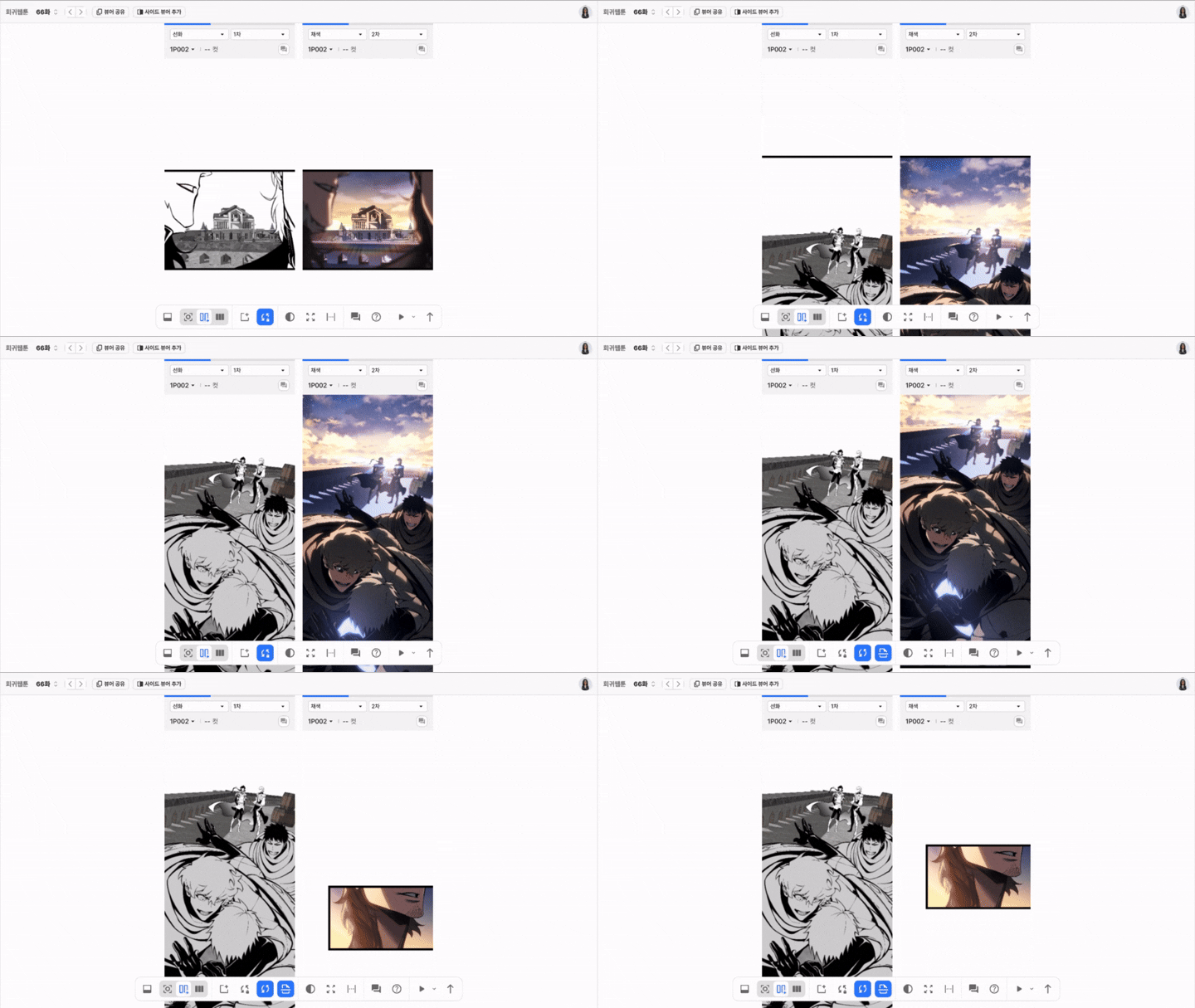
<div align="center" data-full-width="true"><figure><img src="https://367146355-files.gitbook.io/~/files/v0/b/gitbook-x-prod.appspot.com/o/spaces%2FsMjkLQjMXtWEVbJXqPGR%2Fuploads%2Fgit-blob-9ac67db81c9b62da0701b357cc22e46ca592bf64%2Fcompare-mode-resize-720-24.gif?alt=media" alt=""><figcaption></figcaption></figure></div>

* In compare mode, you can add viewers to compare by process and version.
* Share Viewer: Copies a URL link that preserves the current compare mode viewer state.
* Adding a Side Viewer
  * Unlike a regular added viewer, you can also view other episodes.
  * You can add up to 2 side viewers.

### Scroll Sync Features

<table data-search="false"><thead><tr><th>Item</th><th>Icon</th><th>Description</th></tr></thead><tbody><tr><td>Sync all areas<br>On / Off</td><td><img src="https://367146355-files.gitbook.io/~/files/v0/b/gitbook-x-prod.appspot.com/o/spaces%2FsMjkLQjMXtWEVbJXqPGR%2Fuploads%2Fgit-blob-360a7d0cfaeba1b7318a81556d60cc35ddb7e04c%2Fimage%20(5).png?alt=media" alt="" data-size="original"></td><td><ul><li>When on, the scroll state of all viewers is synced; when off, scrolling syncs only to the reference viewer.</li><li>Suited for comparing the same work area by process and version.</li></ul></td></tr><tr><td>Sync scroll<br>On / Off</td><td><img src="https://367146355-files.gitbook.io/~/files/v0/b/gitbook-x-prod.appspot.com/o/spaces%2FsMjkLQjMXtWEVbJXqPGR%2Fuploads%2Fgit-blob-6d4f7f6c777bb0445ed46c4246cd3e2a427fa4cf%2Fimage%20(4).png?alt=media" alt="" data-size="original"></td><td><ul><li>When on, scrolling syncs from the reference viewer; when off, each viewer scrolls independently.</li><li>Suited for when only a specific viewer needs to view a different area.</li></ul></td></tr><tr><td>Sync page<br>On / Off</td><td><img src="https://367146355-files.gitbook.io/~/files/v0/b/gitbook-x-prod.appspot.com/o/spaces%2FsMjkLQjMXtWEVbJXqPGR%2Fuploads%2Fgit-blob-aa3594f4ceb22f0988c0255c595d35e59d4da0a8%2Fimage%20(6).png?alt=media" alt="" data-size="original"></td><td><ul><li>When on, scrolling syncs by page from the reference viewer; when off, scrolling happens by the full image.</li><li>Suited for comparing when page height differs by process and version.</li></ul></td></tr></tbody></table>

## Horizontal Viewer Mode

<figure><img src="https://367146355-files.gitbook.io/~/files/v0/b/gitbook-x-prod.appspot.com/o/spaces%2FsMjkLQjMXtWEVbJXqPGR%2Fuploads%2Fgit-blob-75f06d5c415b634f7f8f91aa25017bc423136d23%2Fimage%20(7).png?alt=media" alt=""><figcaption></figcaption></figure>

* In horizontal viewer mode, pages are arranged horizontally so you can view them at a glance.
* Info: View information about the currently selected version.
* Share Viewer: Copies a URL link that preserves the current horizontal mode viewer state.
* Select Page: Use the toolbar's page selection to choose and view only the pages you want.

## Text Process

* Turning on **`Text compare mode`** arranges panels side by side, and you choose the document to compare in each area with **`Select version`**.
* **`Diff Compare`** is enabled only while compare mode is on, and turns off together with compare mode.
* Changed parts are paired by block and highlighted word by word. Deleted parts are shown with a red strikethrough, and added parts are shown in green.
* Compare mode between the text process and the image process is not provided.
* The text process does not provide horizontal viewer mode.